Skip to content
The Musket FMS Logo, a colour block airplane
  • Home
  • About
  • Features
    • Dashboard and My Portal
    • Flight & Crew Scheduling
    • Passenger Services
    • Client Management
    • Organisation Document Control
    • Staff Management
    • Aircraft Management
    • Maintenance Hub – MRO
    • Flight Operations
    • Quotations & Invoicing
    • Auditing & Reporting
  • Contact
  • Pricing
  • Blog
Book A Free Walkthrough

Category: Musket FMS Solutions & Innovations


  • Why Aviation Operators Need Operational Clarity – Not More Software
    Mar 23, 2026

    ·

    Musket FMS Solutions & Innovations

    Why Aviation Operators Need Operational Clarity – Not More Software

  • From Whiteboard to Workflow – How Musket FMS Simplifies Aviation Ops
    Jun 11, 2025

    ·

    Musket FMS Solutions & Innovations

    From Whiteboard to Workflow – How Musket FMS Simplifies Aviation Ops

  • The Future of Flight Operations: Trends Shaping 2025 and Beyond
    May 16, 2025

    ·

    Musket FMS Solutions & Innovations

    The Future of Flight Operations: Trends Shaping 2025 and Beyond

  • LinkedIn
  • GitHub

Useful Links

Features

Pricing

Contact Us

Musketeer Software Solutions

Contact

Centurion, GP 0157, South Africa

info@musket-fms.com

+27 81 321 4601

Back To Top

© 2025 Musketeer Software Solutions – Privacy Policy
Created by: Magpie Marketing

Musket FMS Passenger Service Pax Database interface

Pax Database

Features:

  • Generate Client Account Statements for any period
  • Statements include transaction dates, references, due dates, status, and more
  • Set account currency per client
  • Include account summary with brought forward, totals, and closing balance

Dashboard

Flight & Crew Scheduling

Passenger Services

Client Management

Organisation Document Control

Staff Management

Aircraft Management

Maintenance Hub – MRO

Flight Operations

Quotations & Invoicing

Auditing & Reporting

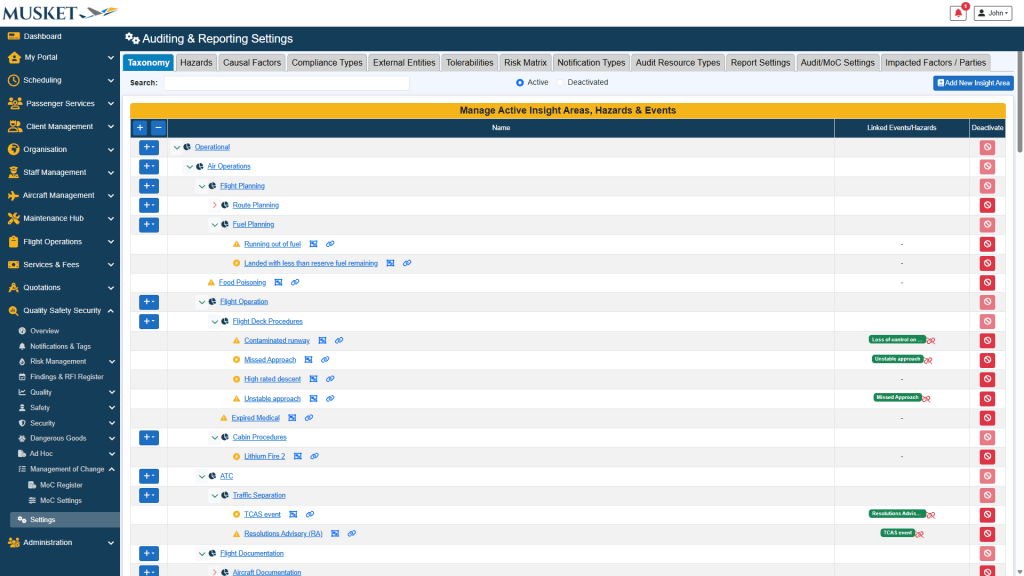
Other QSS Settings

Features:

  • Create and maintain a detailed taxonomy of areas, hazards, and events to be utilised throughout the whole system
  • Determine a unique list of causal categories and factors to be utilised in corrective action submissions
  • Set up a list of external parties with a list of external users and their contact details, and specify which external entity can conduct audits and be audited
  • Define a list of notification types that can be sent in the system along with their deadline period and whether a certain notification type should restrict sign-on for users if not acknowledged
  • Specify if audits and reports should get auto generated subjects
  • Define a detailed list of possible impacted parties for the risk & hazard register

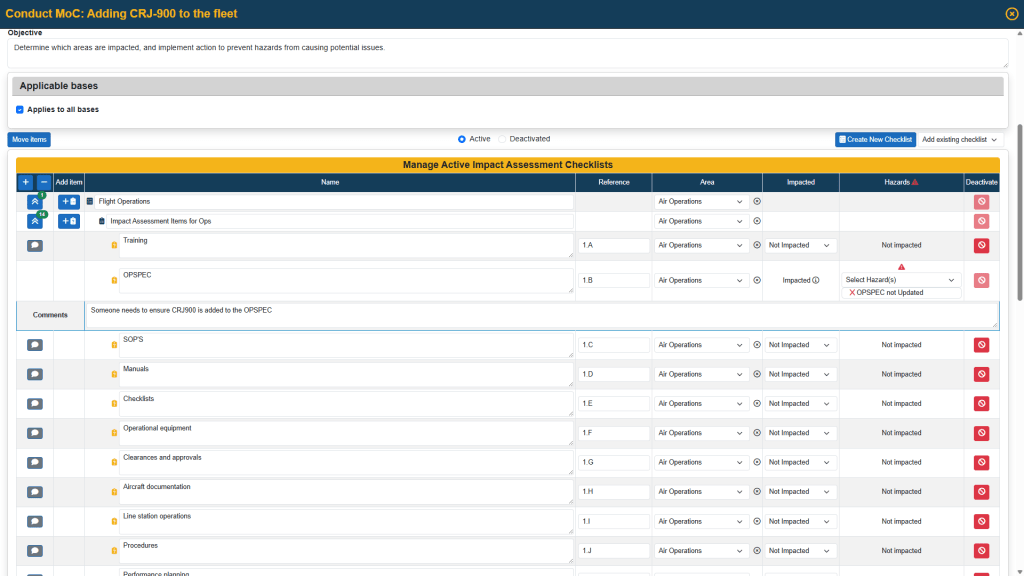
Management of Change

Features:

  • Create and conduct management of change (MoC) assessments
  • Define the date conducted, attendance register, scope and objective for each assessment
  • Link related bases/airports to an MoC assessment
  • Specify the area of each checklist item and also whether it is impacted or not
  • Assign hazards and risks to impacted items and optionally send out corrective action requests or RFIs for review to be linked to the risk & hazard register
  • Finalize and close-out MoC assessments and add impact assessment comments and request a review from team members
  • Create and maintain unique MoC checklists with applicable questions and discussion points
  • Combine checklists using MoC templates and include a default scope and objective, and define a default MoC team for each template
  • Predefine a customisable list of different MoC types/categories
  • Generate detailed MoC reports
  • Receive email alerts for any action requiring your attention

Regulatory Reports -PIC Discretion & Duty Violations

Features:

  • Capture hazards, pre‑risk and residual risk, issue findings/RFIs, and request close-out reviews
  • Manage Close‑out of reports with executive summaries and a full audit trail
  • Export full detailed reports for management and regulators

Reporting

Features:

  • Open investigation on a submitted report, view the submitted information, supply opening remarks, and specify the investigation team and their access
  • Create findings and send corrective action requests to internal users or external parties
  • Create and send requests for information (RFI) to colleagues
  • Review corrective action submissions and RFIs
  • Assign hazards, pre-risk, and residual risk to reports to link to the risk & hazard register
  • Close out reports by requesting a review from a colleague and supplying report close-out summary information and ask Musket Autopilot to assist with these summaries
  • Create and maintain company specific report categories/forms and specify the default investigation team for each report
  • Link related objects to your report category like aircraft, users, airports, clients, and more
  • Define a company specific risk matrix
  • Generate a comprehensive report for submitted reports with various filter options
  • Receive email alerts when new reports gets submitted and for any action requiring your attention

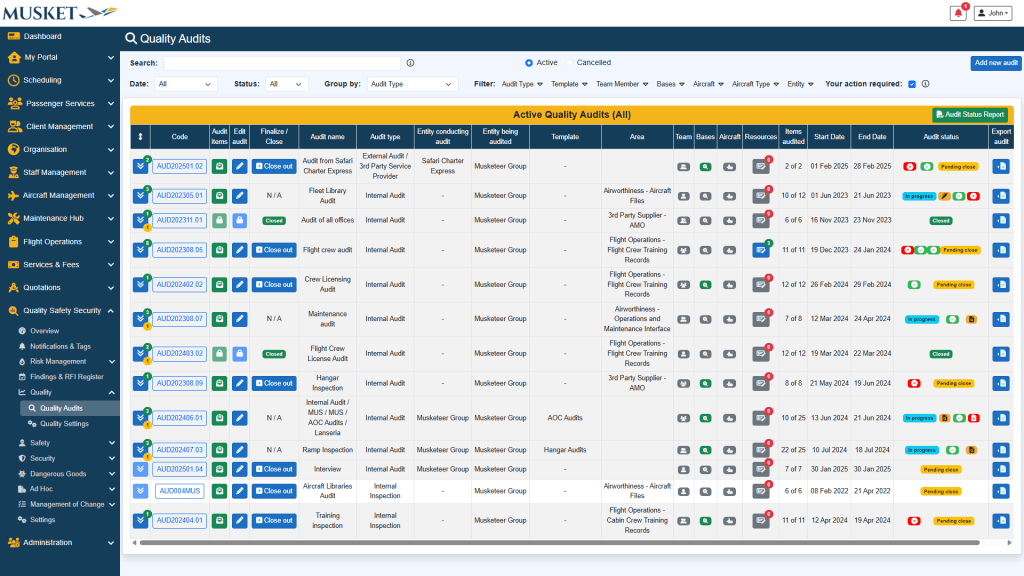
Auditing

Features:

  • Create audits by specifying start and end dates, scope, objective, and checklists to be used
  • Link different audit areas, entities, bases/airports, and aircraft to an audit
  • Conduct audits to assign different compliance outcomes to each question
  • Assign corrective action requests to internal users or external parties
  • Review corrective action submissions and assign hazards and initial/residual risk
  • Finalize and Close out audits by requesting a review from a colleague and supplying executive summaries, finding summaries, scope for improvement, and additional comments and ask Musket Autopilot to assist with these summaries
  • Create and maintain company specific audit checklists with related questions
  • Combine checklists using audit templates and include a default scope and objective, and define a default audit team
  • Specify audit team members’ access levels and responsibilities
  • Predefine different audit types, compliance types, and audit report configurations
  • Generate audit status reports with various filter options
  • Receive email alerts for any action requiring your attention

Findings & RFI Register

Features:

  • View all finding, corrective action, and request for information (RFI) details across all sections on one page
  • Review corrective action request, RFI, and extension request submissions
  • Direct in-app messaging with the responsible person
  • Export finding/request reports
  • Add standalone actions or RFIs

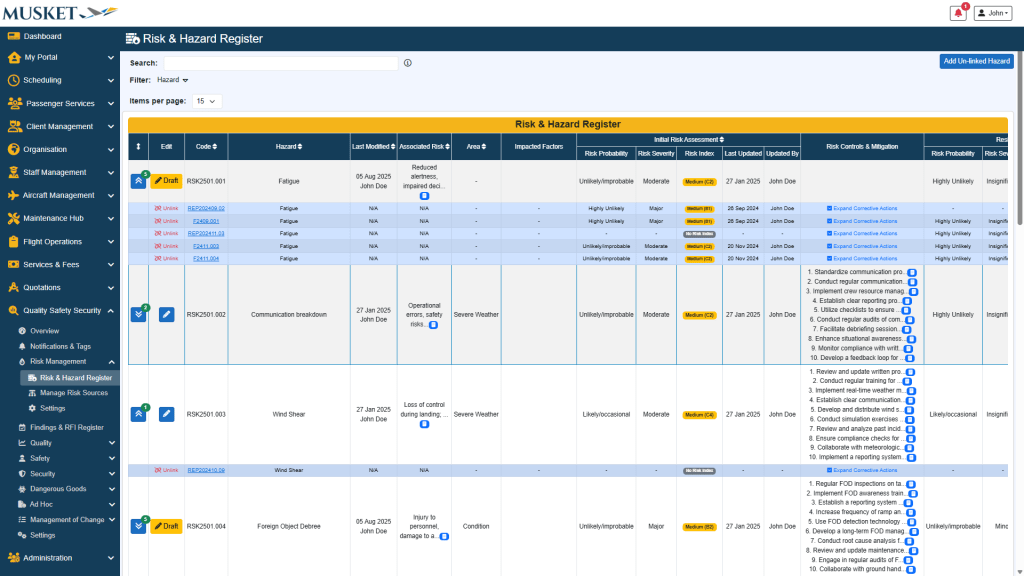
Risk Management

Features:

  • Link various sources of hazards and their associated risk to a single risk and hazard register
  • Define risk indices, associated risks, areas, impacted factors, risk controls & mitigation, and root causes to a hazard
  • View all linked sources and their related details for a hazard
  • Auto-generate associated risks, risk controls & mitigation, and root causes for a hazard with Musket Autopilot (integrated AI functionality)

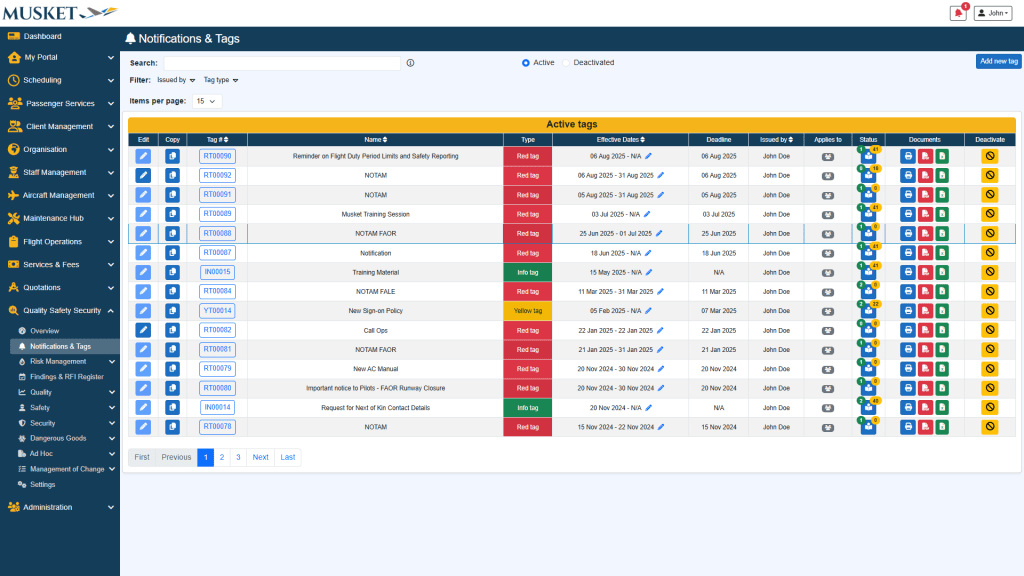
Notifications & Tags

Features:

  • Create tags/notices with different tag types, validity periods, deadlines, and more
  • Target a specific audience (Applies to all users or select Roles and/or specific users)
  • Attach documents for users to read before acknowledgement
  • Acknowledge tracking: View acknowledged and unacknowledged users with timestamps
  • Send an email to unacknowledged users with one click

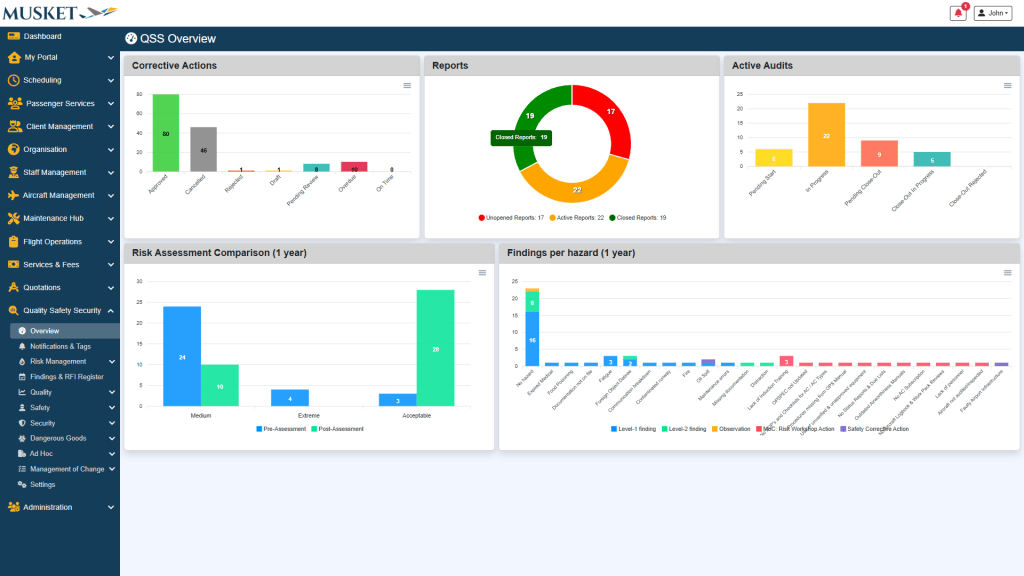
Overview

Features:

  • Corrective Actions overview by status (Approved, Overdue, On‑time, Pending review, etc.)
  • Reports chart categorising unopened, active, and closed reports
  • Active Audits bar shows audits Pending Start, In‑Progress, Pending Close‑out and other states
  • Risk Assessment Comparison compares pre- and post risk assessments according to your predefined risk tolerabilities
  • Findings per hazard graph that highlights hazards causing the most findings

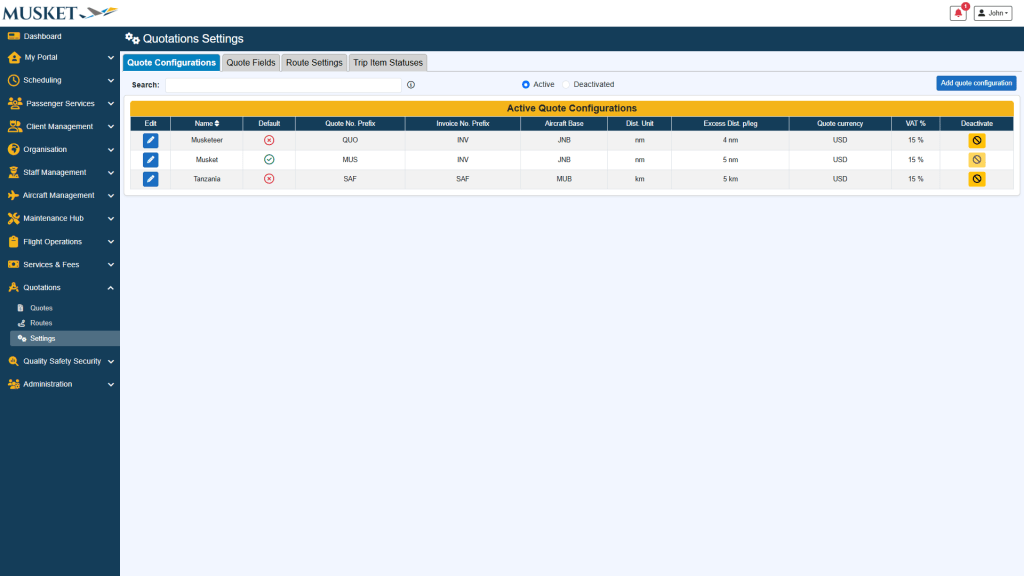
Other Quote Settings

Features:

  • Quote Configurations – Define multiple configurations with company details, document code format, default aircraft base, distance units, quote currency, VAT %, discounts, turnaround times, and more
  • Document Layout – Define various formats for quote and invoice documents including bespoke terms and conditions
  • Quote Fields – Add custom fields to capture bespoke data on quotes

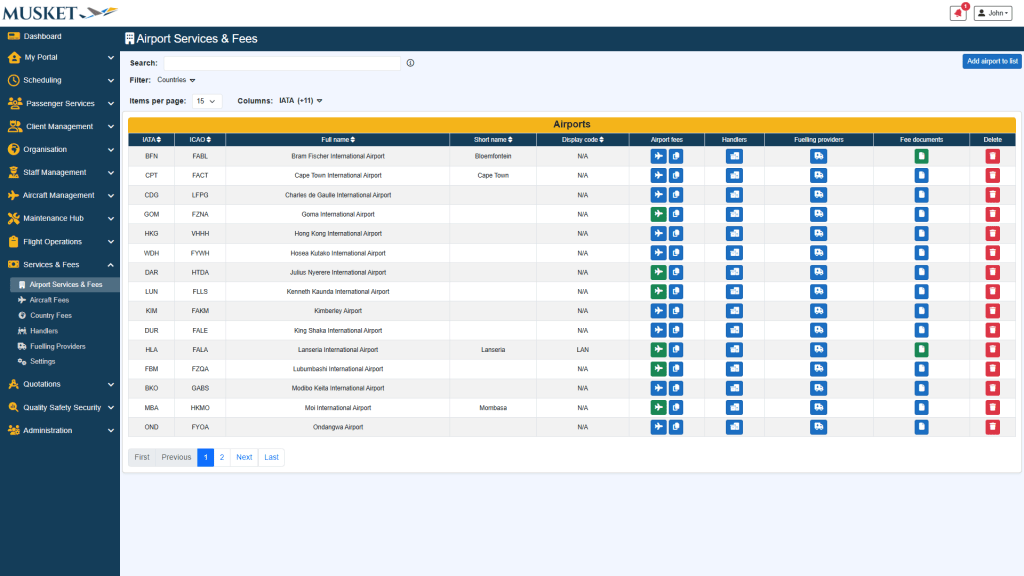
Services & Fees

Features:

  • Allocate various airport services and their related fees to auto-generate on quotations
  • Set up aircraft specific or aircraft type cost profiles according to distance or flight hours including other related standard fees and/or distance shortfall fees
  • Assign airports to specific classes per country with their related services and fees
  • Populate different handling companies and fuelling providers with related contact details

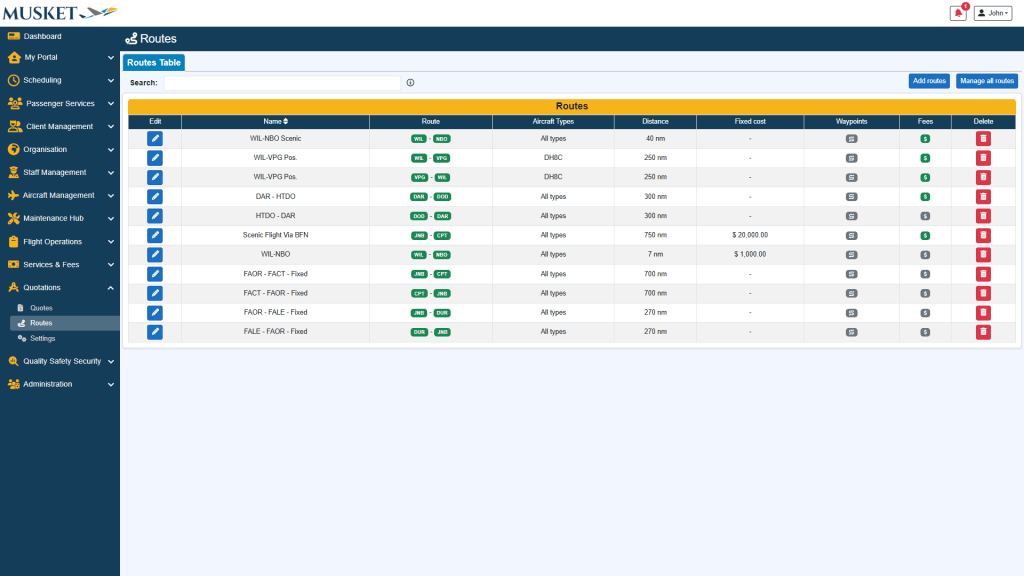
Routes

Features:

  • Add predefined routes to be used in quotes, with predefined distances, costs, and other applicable fees.
  • Routes can be assigned for use by specific aircraft or aircraft types

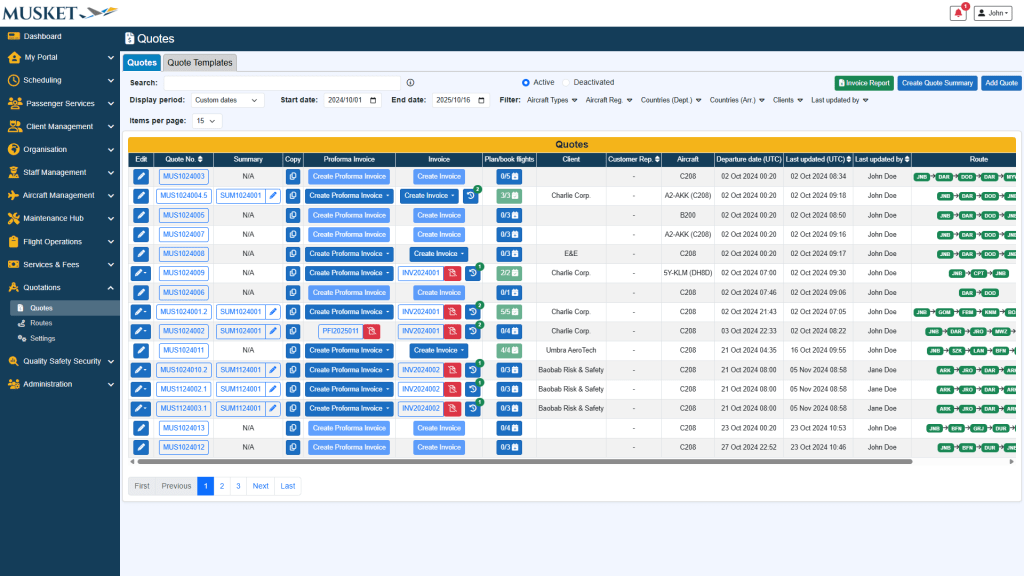
Quotes

Features:

  • Generate quotes with flight details with various fees for aircraft, airport, enroute, and general.
  • Define discounts, VAT, quote currency, cost calculation type (distance/hourly), different aircraft cost profiles, and more
  • Auto-populate various fees including landing, approach, parking, passenger, navigational, distance shortfall, and more
  • Copy previous quotes for easy quote generation, or create different quote templates
  • Create proforma invoices from single or multiple quotes to send to clients
  • Create invoices from single or multiple quotes including payment methods and due dates
  • Cancel and credit note invoices and view a full history of all invoices and credit notes for each quote
  • Submit approved quote flights directly to your flight schedule with all related details
  • Generate quote summaries to send to clients
  • Generate invoice reports with various filters for internal or external distribution

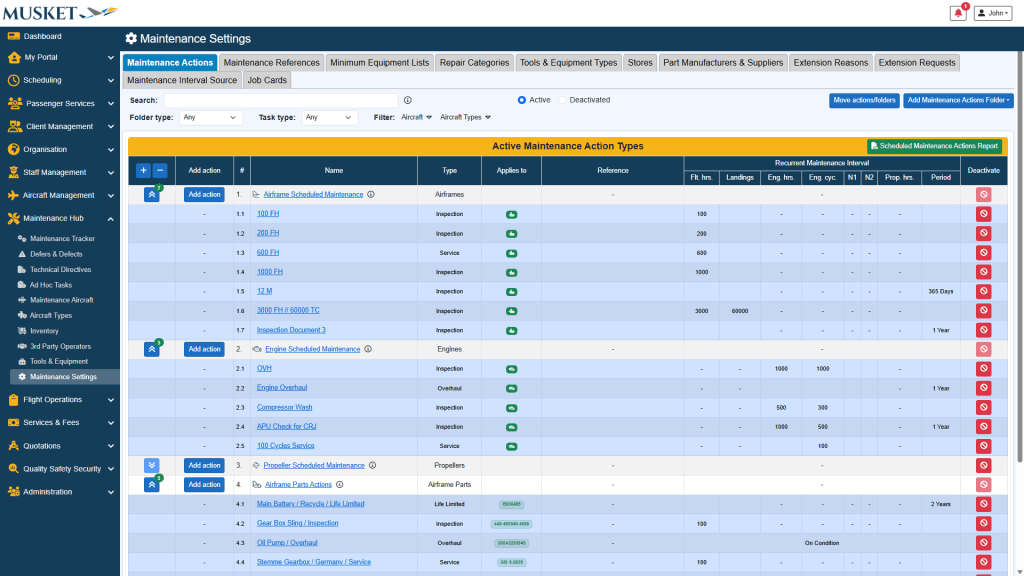
Maintenance Actions

Features:

  • Build nested maintenance programmes (e.g., basic inspections, class‑specific checks, life‑limited components) with task types, applicable aircraft and intervals (hours, cycles, landings, periods)
  • Produce a Scheduled Maintenance Actions Report
  • Set up and define Maintenance references, Minimum Equipment Lists, Repair Categories, stores and suppliers, plus rules for extensions and job‑card requests
  • Ability to define whether the maintenance interval source must derive from post flight actuals or manual logbook entries.

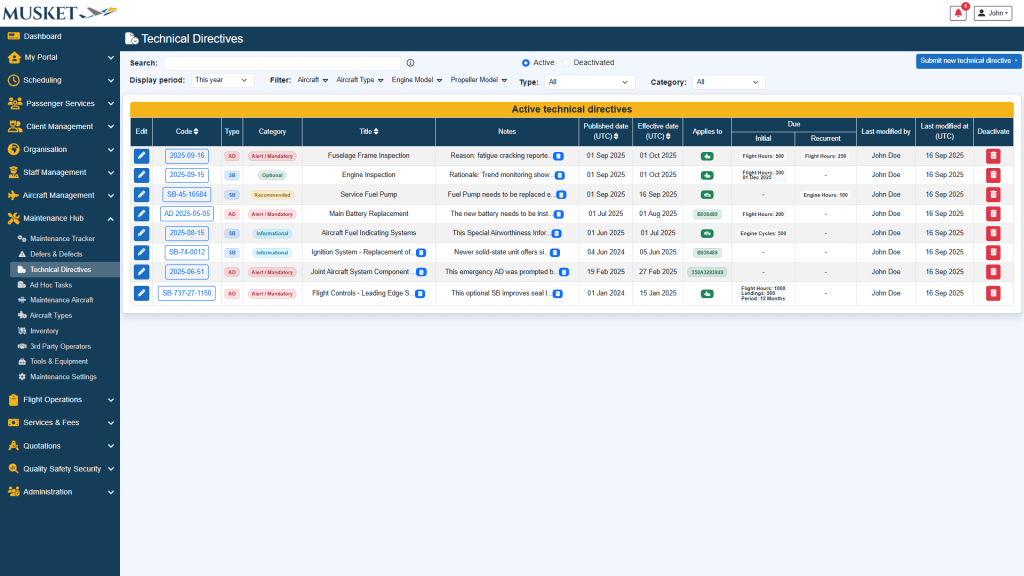
Technical Directives

Features:

  • Records Technical directives (ADs/SBs) with code, type, category, title, notes, published and effective dates.
  • Lets you submit new technical directives and record notes about compliance or applicability
  • Specify initial or recurrent intervals per technical directive
  • Link technical directives to specific aircraft, aircraft types, engines, propellers, or parts
  • Specify terminating action per technical directive

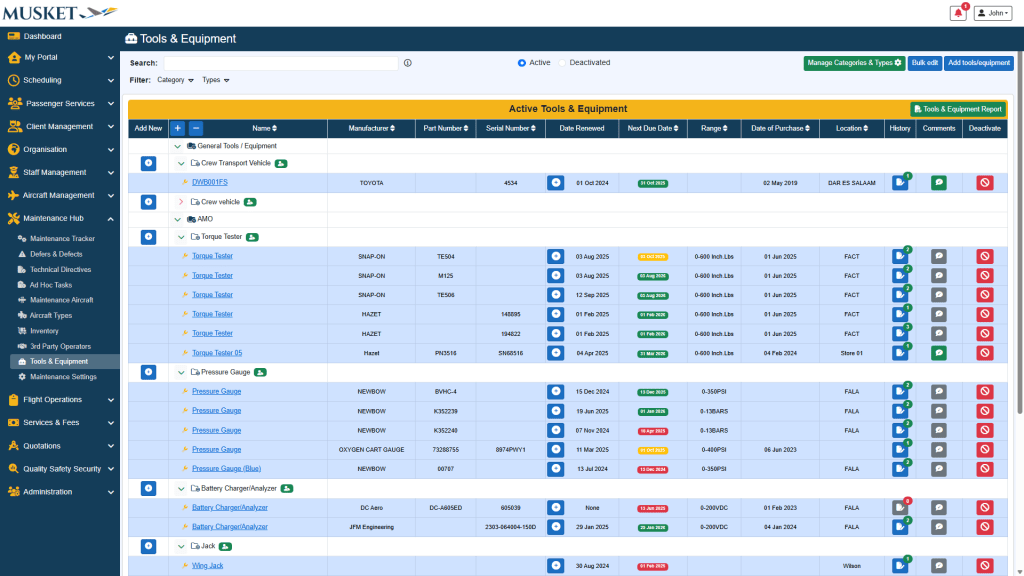
Tools & Equipment

Features:

  • Build a hierarchy of tool & equipment categories and types
  • Add tools & equipment with related details including:
    • Manufacturer
    • Part number
    • Serial number
    • Location
    • History and more
  • Track date renewed and next due date with visual and email alerts
  • Keep attachments, change history, and comments
  • Generate a Tools & Equipment Items Report for export/print

3rd Party Operators

Features:

  • Maintain a directory of external companies for which maintenance is done including their related details
  • Aircraft and parts can be assigned to third party operators

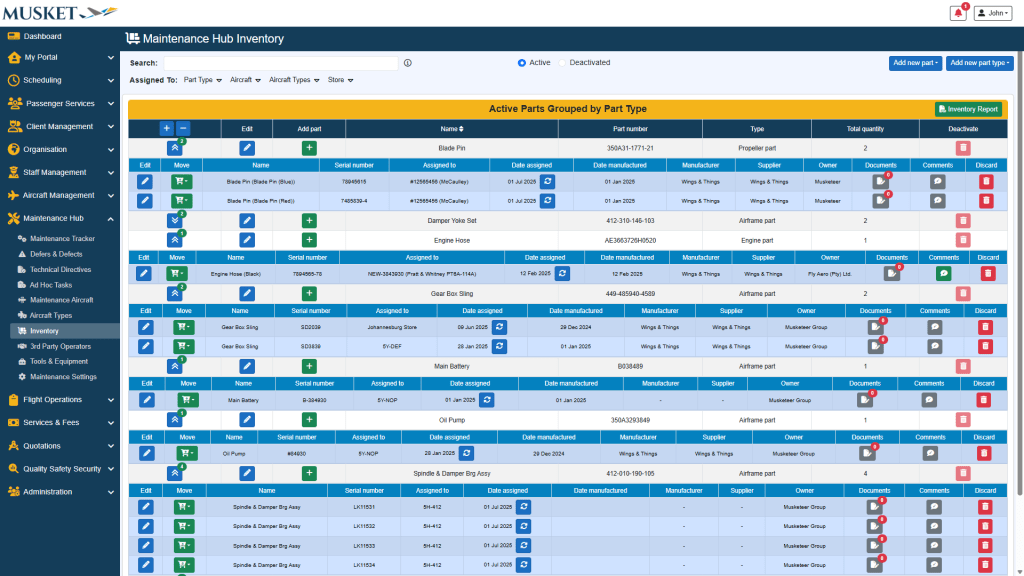
Inventory

Features:

  • Add or manage parts and part types with all their related details including part numbers, serial numbers, assignments, and more
  • Group parts by Part Type, showing part numbers and the total quantity of parts
  • Assign parts to different components or move to stores
  • Allows adding of documents and comments for each part

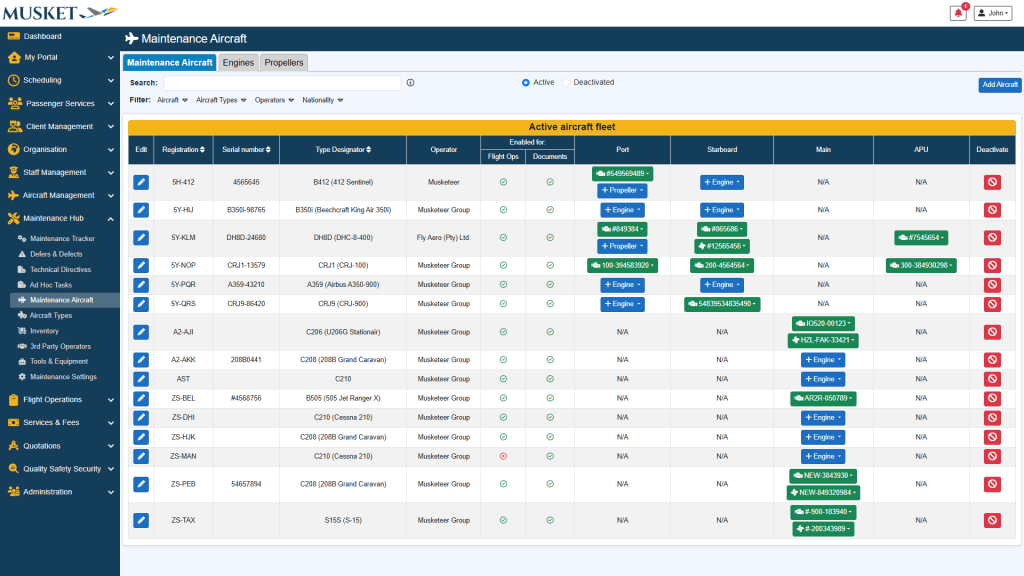
Maintenance Aircraft

Features:

  • Manage maintenance aircraft and their related engines and propellers
  • Create and assign new engines and propellers with all their related details
  • Move engines and propellers to other aircraft or to stores
  • View full assignment history of engines and propellers

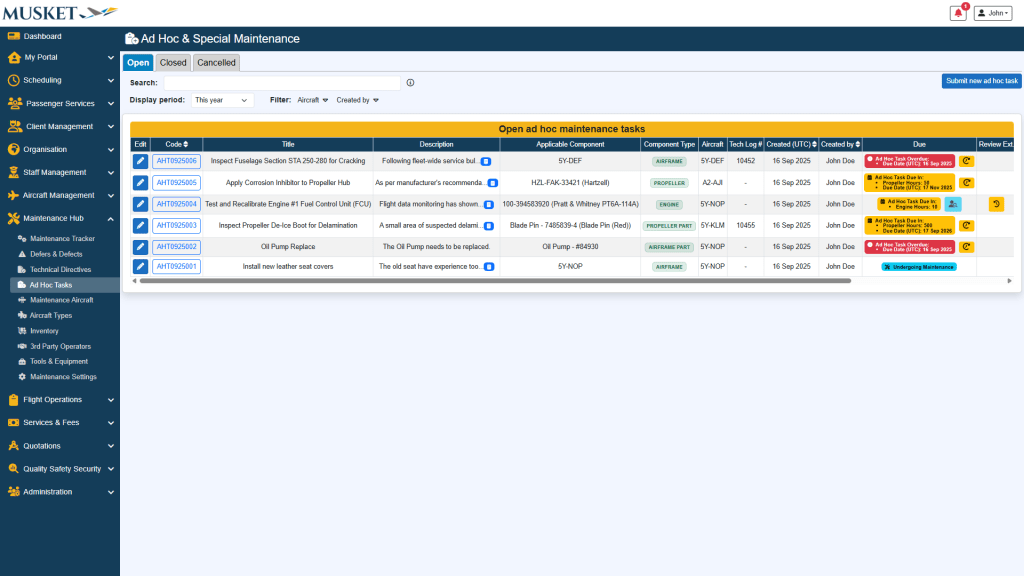
Ad Hoc Tasks

Features:

  • Add one-off maintenance jobs
  • Assign the task to an aircraft, airframe, engine, propeller, or specific component/part
  • Set due criteria by date or utilisation (flight hours, landings, cycles, engine hours, propeller hours)
  • Printable job cards, attachments, tech-log links, and a full review/approval audit trail
  • Request/review extensions, capture sign-off, and export history for compliance and trend reporting

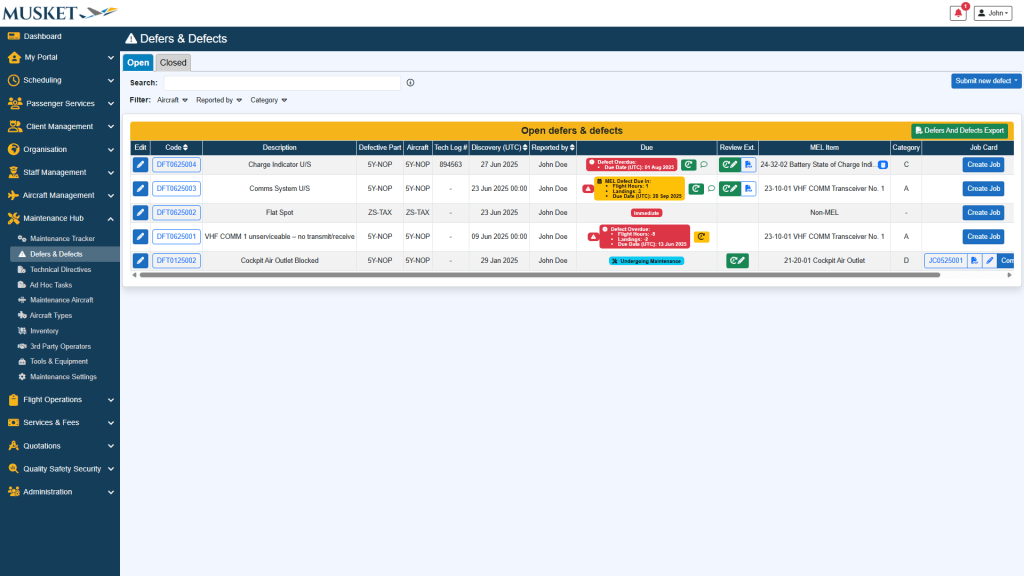
Defers &
Defects

Features:

  • Tracks defects by code, description, defective part, aircraft, discovery date, and more
  • Submit new MEL or Non-MEL defects and link them with specific components or parts
  • Link MEL defects with a specific aircraft MEL for specific due intervals
  • Submit and/or review extension requests on MEL defects
  • Create maintenance jobs for specific or multiple defects with related work sheets

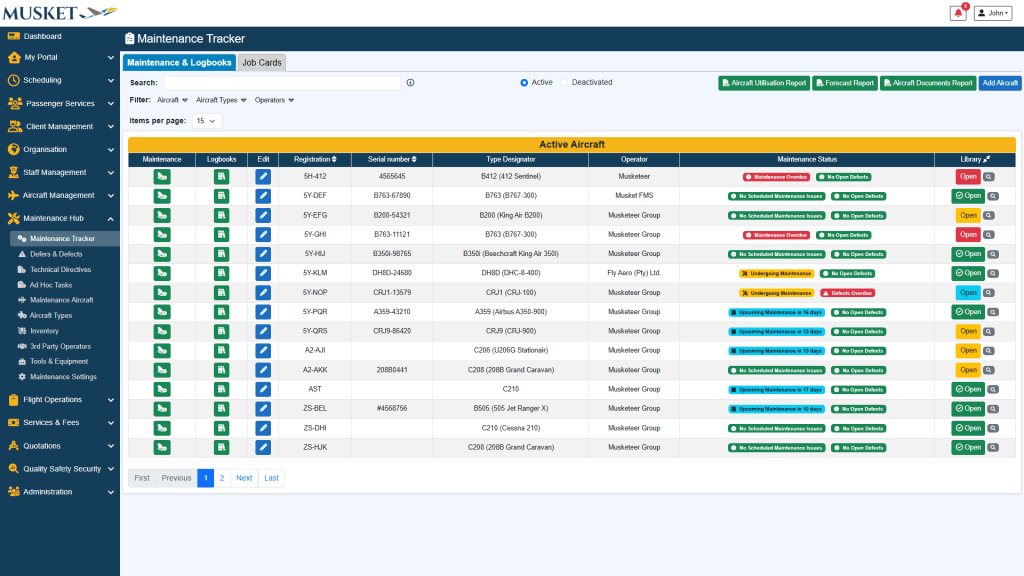
Maintenance Tracker

Features:

  • Lists every active aircraft with maintenance status indicators (maintenance overdue, upcoming, or in progress)
  • Access the Maintenance tracker of each aircraft to view all defects, technical directives, and scheduled maintenance tasks with their remaining intervals
  • Create maintenance jobs for single or multiple maintenance tasks with auto generated work sheets for each job
  • Generate detailed maintenance tracking and forecast reports
  • Access and capture Logbooks data for each aircraft.
  • Generate Aircraft Utilisation reports with all relevant airframe, engine, and propeller details and metrics
  • View all current and historical Job Cards with their related details in one place

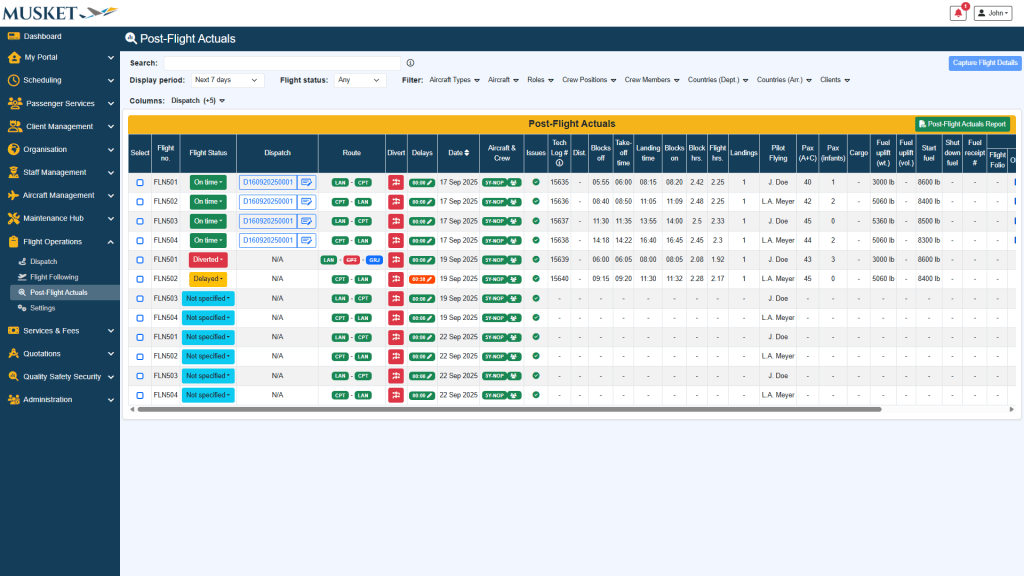
Post‑Flight Actuals

Features:

  • Capture all post-flight actual details for single or multiple flights at a time
  • Optionally copy flight following data to post-flight actuals
  • Upload all related flight documentation for historical records
  • Receive system generated issue alerts for possible faulty post-flight actual data

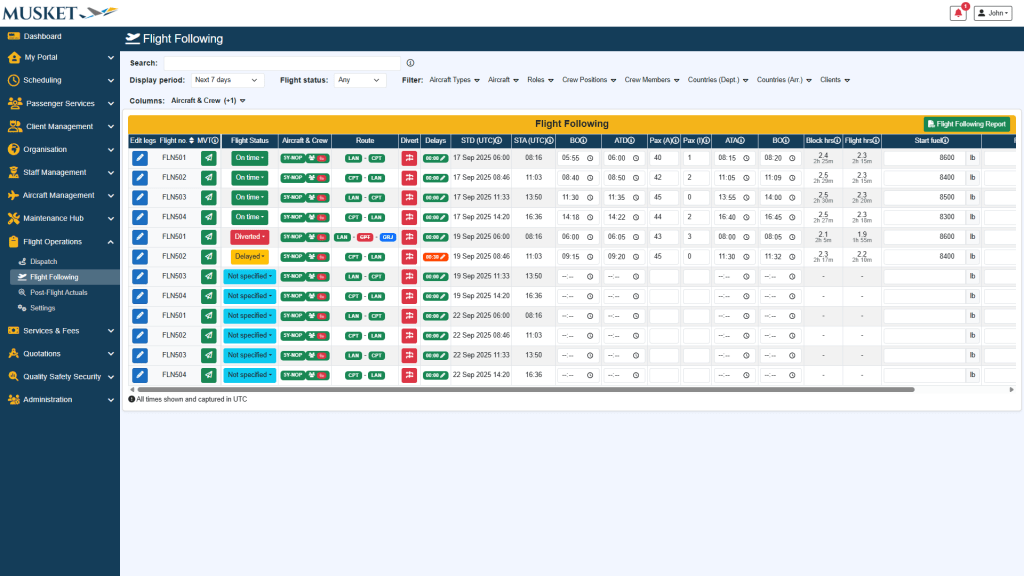
Flight Following

Features:

  • Update flight status and log diversions and/or delays with linked delay codes
  • Capture flight details (departure/arrival times, passenger info, fuel figures, etc) live as they happen
  • Send out movement messages to impacted parties
  • Generate a Flight Following Report for operational overview.

Dispatch

Features:

  • Create new dispatch packages from your published flight schedule.
  • Dispatch packages includes crew briefs containing all flight and related details, passenger manifests, general declaration forms, and any other uploaded documents
  • View, edit, or export dispatch packages
  • Keep track of the full dispatch history

Aircraft Document Structure

Features:

  • Ensure no certificate, permit, or manual falls through the cracks with built‑in tracking and automatic emails
  • Build a hierarchical Aircraft Library tree
  • Set each document type as mandatory or optional
  • Specify default validity periods for specific documents

Fleet Management

Features:

  • Record aircraft registration, serial number, operator, nationality, model, passenger seating capacity, maximum take‑off weight (MTOW), and more
  • Enable or disable an airframe for Flight Operations, Maintenance Hub, and Documents
  • Manage a dedicated library per aircraft: assign required documents, store issue/expiry dates, upload files, and view status
  • Receive email alerts when aircraft documents are about to expire
  • Customise engine positions and post‑flight data fields when a type differs from the default
  • Generate comprehensive Aircraft Documents Reports showing document validity across your fleet, colour‑coded and with clickable links for quick review

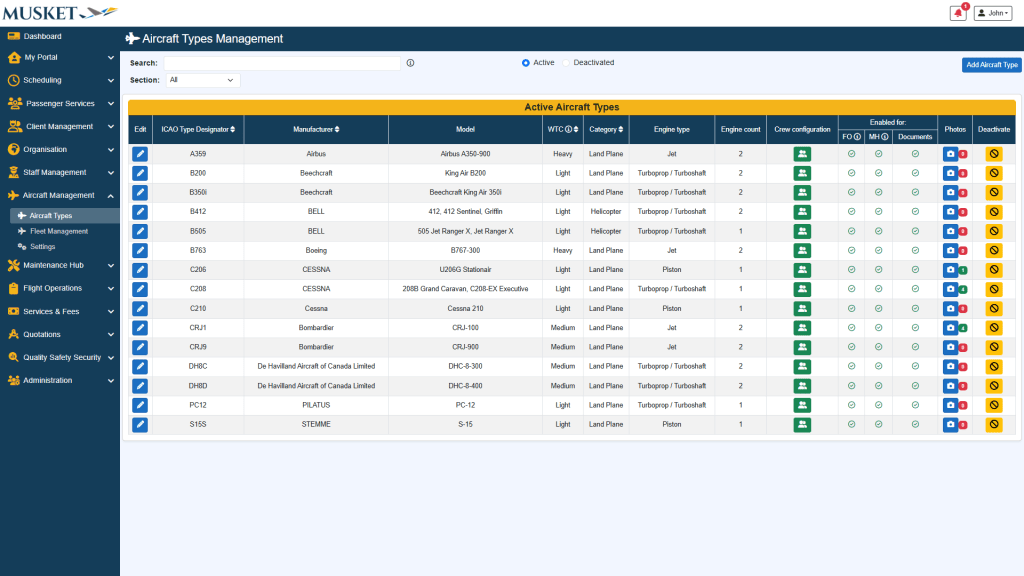
Aircraft Types

Features:

  • Maintain each aircraft type’s ICAO designator, manufacturer, model(s), weight category, engine type/count, and class
  • Configure multiple models (e.g.  PAX vs Cargo) under one type
  • Enable or disable each aircraft type for Flight Operations, Maintenance Hub, and/or Documents
  • Build Default Flight Data Fields—pick which values (Fuel fields, Hobbs, tach time, pax quantities, etc.) are required
  • Specify which fields must be mapped to maintenance hours and crew hours, or flight operations forms
  • Specify Default Engine Positions and their fields to be captured in post flight actuals
  • Set crew seat configurations per type/regulation to ensure correct rostering

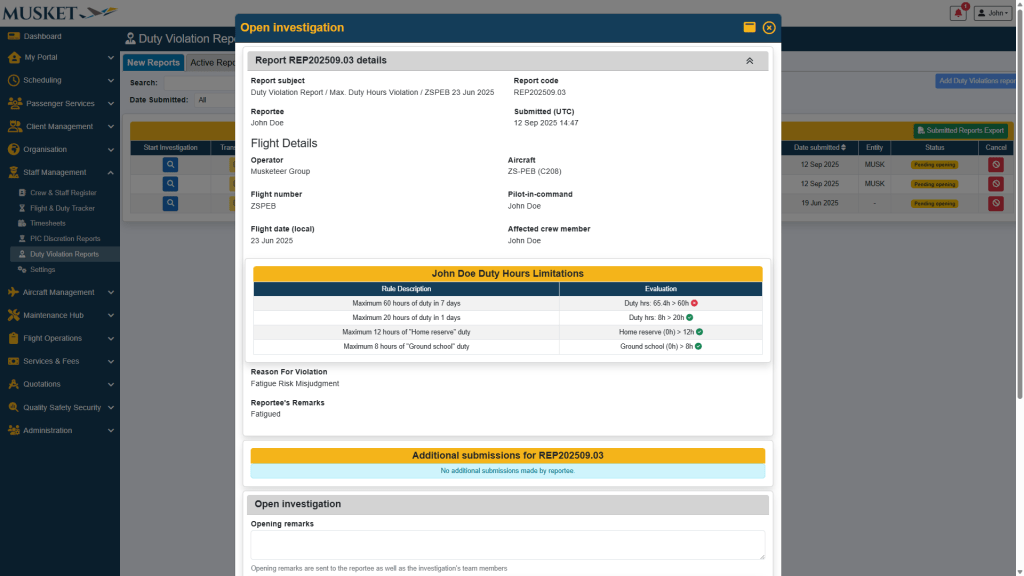
Regulatory Reports
PIC Discretion & Duty Violations

Features:

  • Capture hazards, pre‑risk and residual risk, issue findings/RFIs, and request close-out reviews
  • Manage Close‑out of reports with executive summaries and a full audit trail
  • Export full detailed reports for management and regulators

Timesheets

Features:

  • View and record sign-on/off periods
  • View duty period and FDP period durations
  • Submit PIC Discretion and Duty Violation reports
  • Filter according to duties with PIC Discretions and/or Duty violations

Flight & Duty Tracker

Features:

  • View current Flight, Duty and FDP totals per person
  • FDP Overview timeline for all staff including duty phases and rest/off periods, plus indicators for current and maximum flight hours, duty hours, non-flight duty hours, and off day evaluations
  • Built‑in Rest evaluation (preceding rest, local nights, off‑day counters) with a live list of Applicable Rules

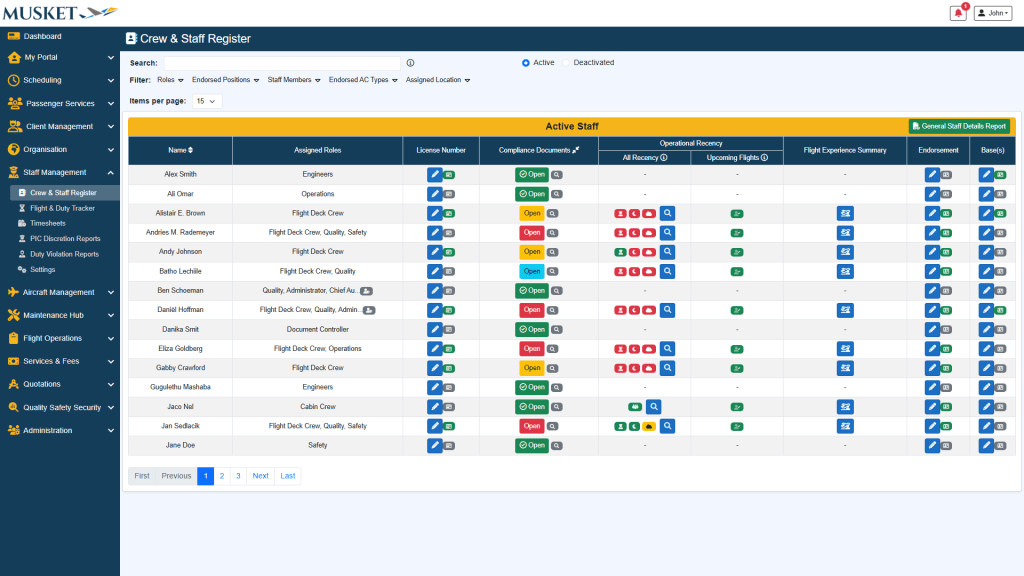
Crew & Staff Register

Features:

  • View assigned roles, endorsed positions, and base assignments
  • View and update staff compliance documents and receive notifications when items are about to expire
  • Check Operational Recency (General, IFR, Night) by aircraft type/class
  • See Flight Experience Summary totals by type/class
  • Manage and assign staff endorsements
  • Export a General Staff Details Report for audits or management reviews

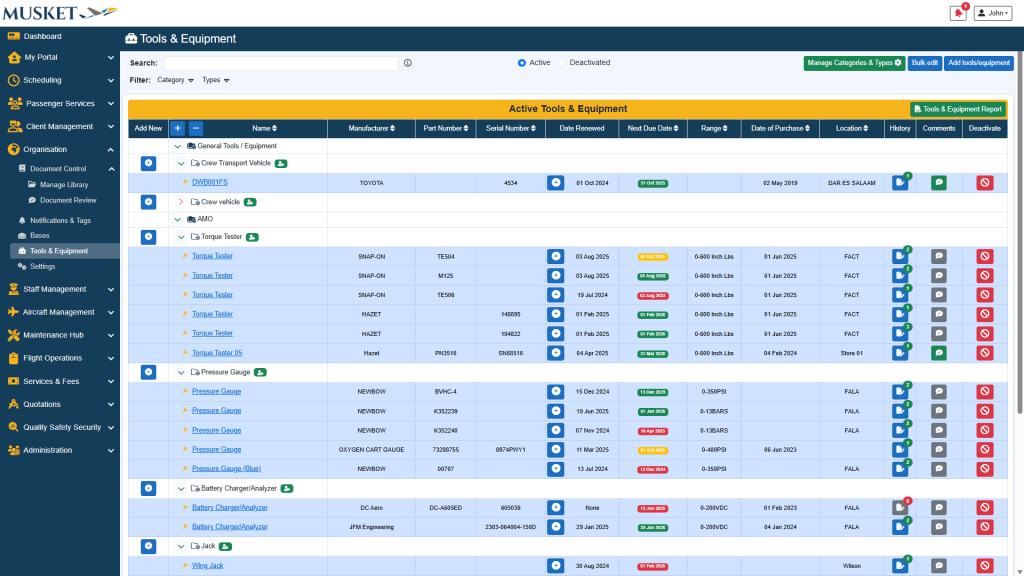
Tools & Equipment

Features:

  • Build a hierarchy of tool & equipment categories and types
  • Add tools & equipment with related details including:
    • Manufacturer
    • Part number
    • Serial number
    • Location
    • History and more
  • Track date renewed and next due date with visual and email alerts
  • Keep attachments, change history, and comments
  • Generate a Tools & Equipment Items Report for export/print

Bases

Features:

  • Add company bases and link each to the correct airport and time zone
  • Base data feeds scheduling, rosters, auditing, reporting, and notification targeting
  • Quickly view airport details of each base

Notifications & Tags

Features:

  • Create tags/notices with different tag types, valid periods, deadlines, and more
  • Target a specific audience (Applies to all users or select Roles and specific users)
  • Attach documents for users to read before acknowledgement
  • Acknowledge tracking: View acknowledged and unacknowledged users with timestamps
  • Send an email to unacknowledged users with one click

Document Review

Features:

  • Raise review requests per document issue/revision; assign one or multiple reviewers
  • Approve or Reject document reviews with remarks and a full audit trail
  • Request subsequent reviews on later revisions

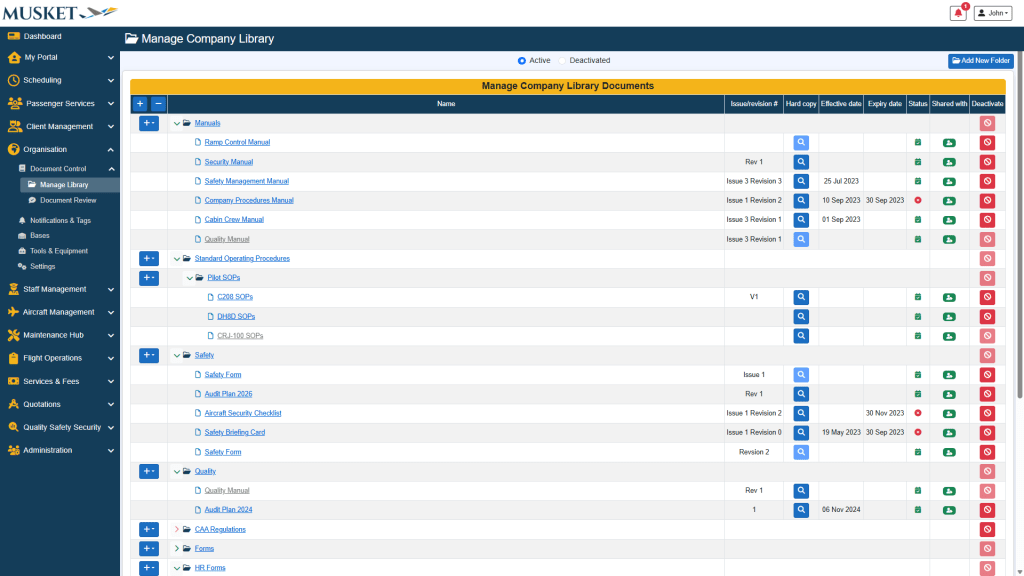
Document Control

Features:

  • Organise company documents with different folders and document types
  • Store editable and hard‑copy files and track their published status, expiry, and more
  • Receive email notifications when documents are about to expire
  • Fine‑grained access for any document
  • Create a notification when publishing a document in one easy step
  • Access to shared company documents on the mobile app (even when offline)

Pax Database

Features:

  • Generate Client Account Statements for any period
  • Statements include transaction dates, references, due dates, status, and more
  • Include account summary with brought forward, totals, and closing balance

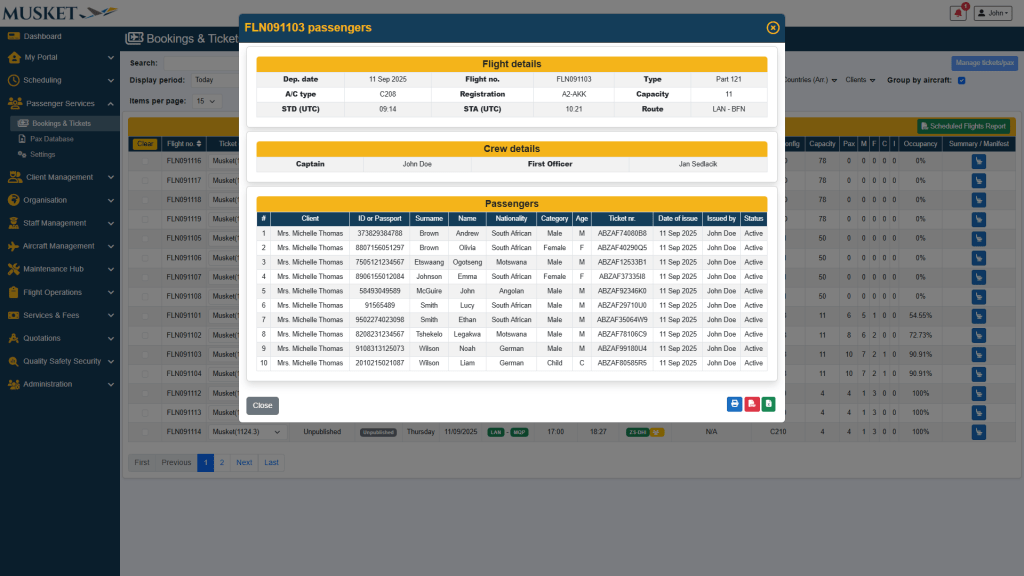
Tickets & Manifests

Features:

  • Generate QR‑coded e‑tickets per passenger with full itinerary
  • Issue group tickets for multi‑passenger, multi‑sector journeys
  • Produce Passenger Manifests with crew/aircraft details and PIC signature line

Bookings & Tickets

Features:

  • Work from a flight list tied to your published schedule
  • Add single passengers or group bookings across one or multiple sectors
  • Capture passenger details including ID/passport, nationality, weight, luggage, dietary needs, and more
  • Attach supporting passenger documents
  • See aircraft capacity, passenger counts, categories, and occupancy at a glance

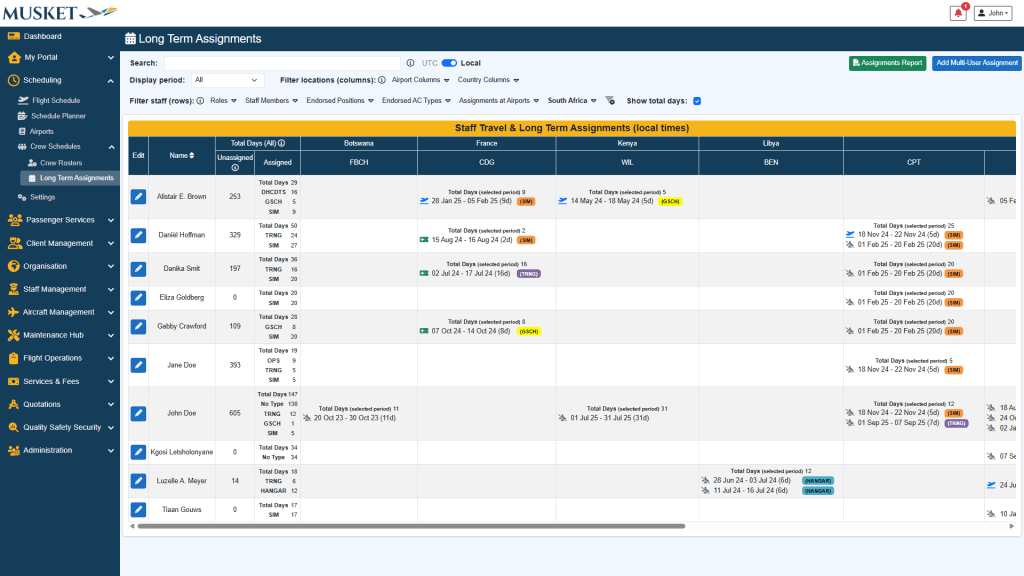
Long Term Assignments

Features:

  • Record long term duty types and assignments for staff members across countries
  • Record staff travel between different assignments
  • See assignment history and total days per duty/location

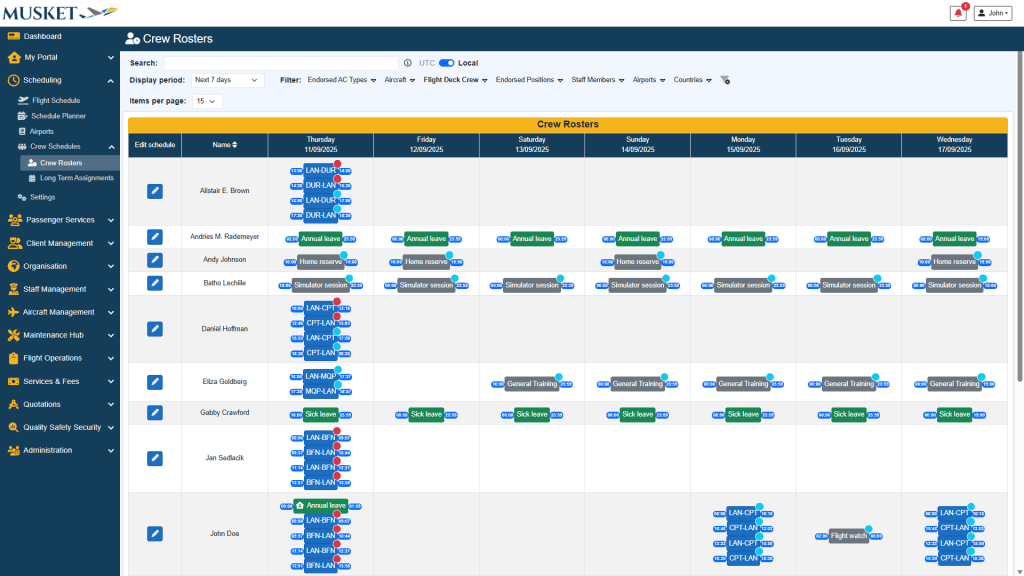
Crew Rosters

Features:

  • View all staff duties at a glance
  • Assign flight duties, non-flight duties and rest/leave for staff members
  • View individual staff schedules in a calendar-style layout
  • Identify gaps, conflicts, and unassigned days
  • Edit schedules in line with compliance limits

Airports

Features:

  • Add and manage airports with codes, coordinates, and custom names
  • Link documents, charts, and runway details for each airport
  • Record and view known hazards, alternates, and operational restrictions

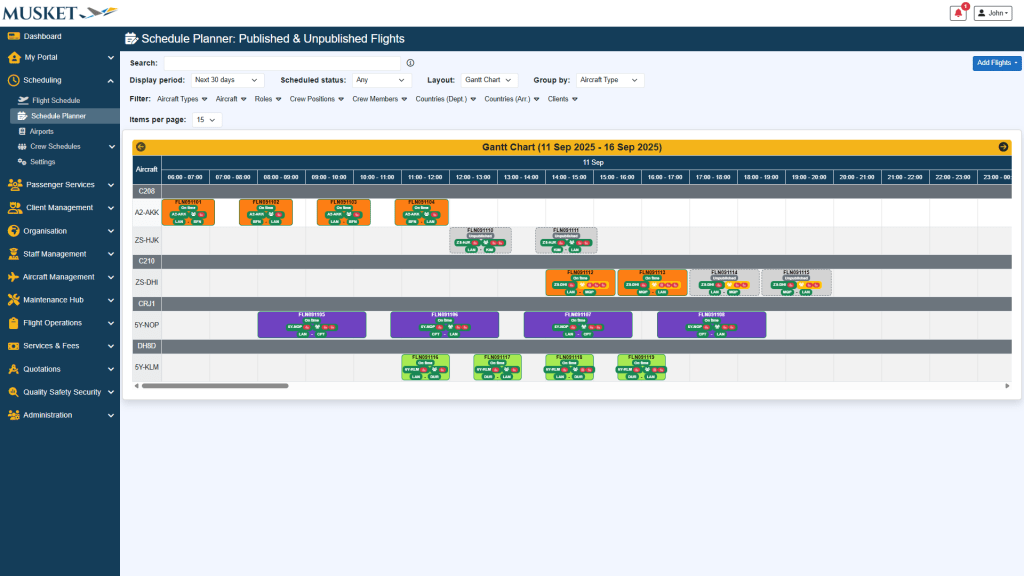
Schedule Planner

Features:

  • View both published and unpublished flights in a single planning tool
  • Spot potential compliance issues or duty violations before they happen
  • Visual alerts for maximum duty hours, rest periods, and FDP limits
  • Add, edit, or reschedule flights using real-time validation
  • Publish flights directly once all checks are passed

Flight Schedule

Features:

  • Schedule individual flights or set up repeating flight schedules
  • View only published flights with all their related details for complete operational clarity
  • Monitor FDP compliance, crew pairing, and aircraft assignments per flight
  • Timeline (Gantt) view to spot overlaps, gaps, or tight turnarounds at a glance
  • Receive warnings for crew operational and document recency
  • Leave comments on flights for other staff or crew members

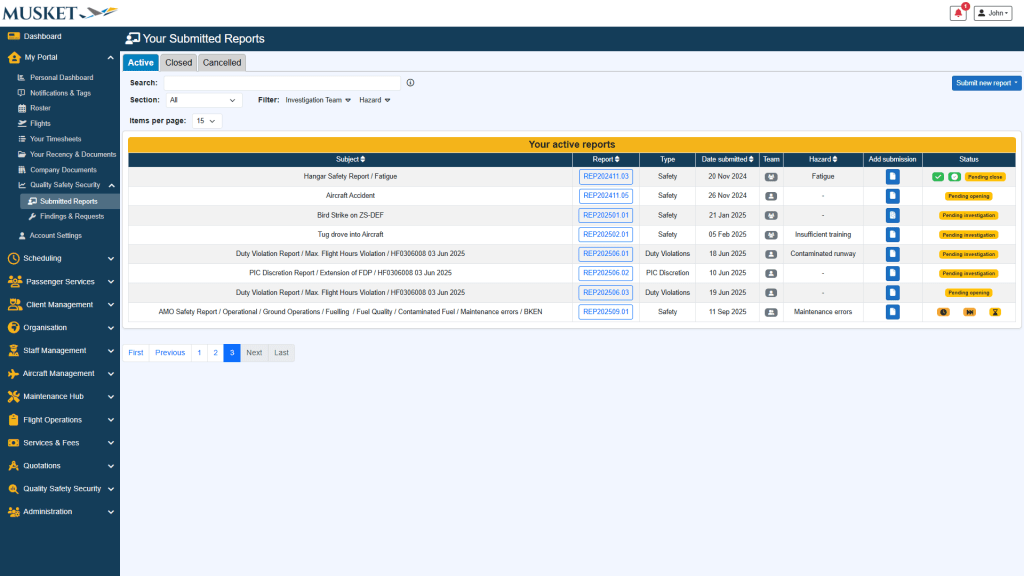
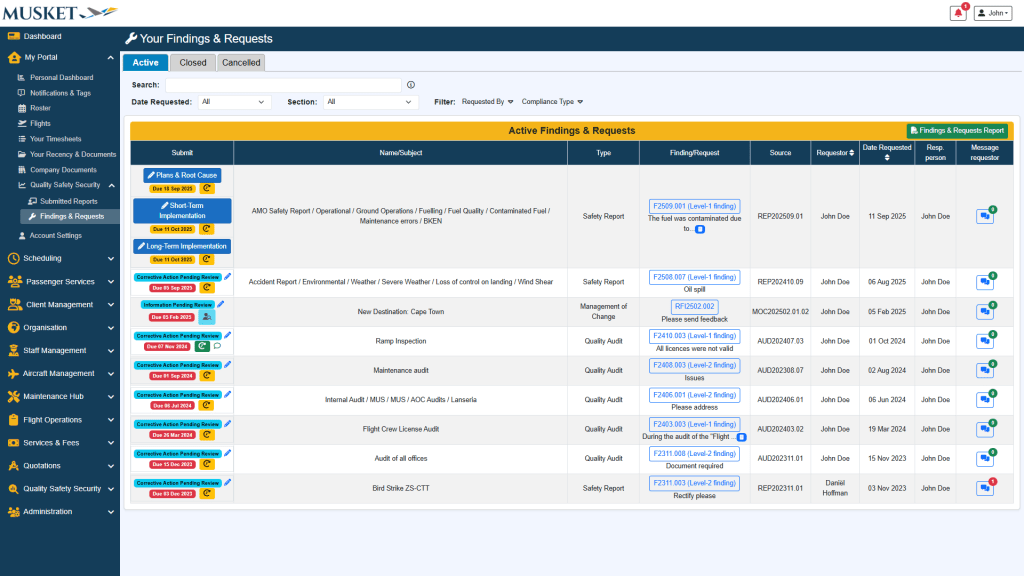
Reporting & Action Requests

Features:

  • Submit various kinds of reports
  • View status of each submitted report
  • Submit additional submissions on a report
  • Receive notifications when a submitted report has started and closed investigation
  • Receive and action requests for information
  • Receive and action corrective action requests
  • Request time extensions on pending actions
  • Direct messaging between yourself and the requestor

Company Documents

Features:

  • View and access published company documents shared with you
  • View status of documents and expiry dates
  • Download company documents (if authorized)
  • Full offline access via the mobile app

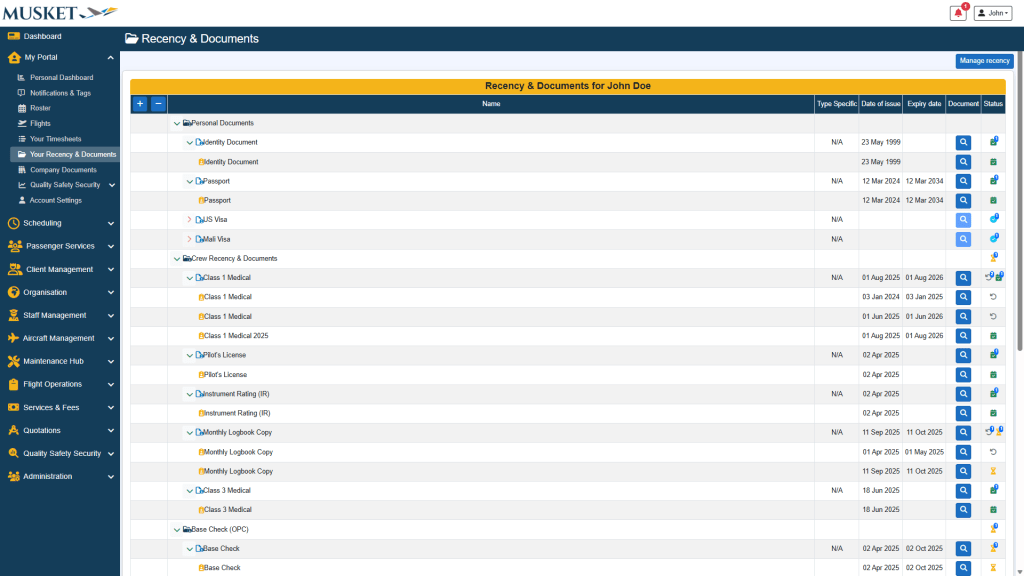
Your Recency & Documents

Features:

  • All your personal and operational documents in one place
  • Receive alerts on document expiration
  • Edit and update your documents (if authorized)

Your Recency & Documents

Features:

  • All your personal and operational documents in one place
  • Receive alerts on document expiration
  • Edit and update your documents (if authorized)

Your Timesheets

Features:

  • View individual duties, sign on/off, and their durations
  • Track personal regulatory compliance and historical duty records
  • Submit duty violation and PIC discretion reports
  • Add or edit sign on/off periods

Your Flights & Recency

Features:

  • See upcoming and past assigned flights with all their related details
  • View and edit flight status
  • Add/edit post-flight data (if authorized)
  • Aircraft and personal document status alerts
  • Receive personal operational recency alerts
  • View regulatory compliance for each sector
  • Submit duty violation and PIC discretion reports
  • Leave comments on individual flight sectors

Roster & Duty Calendar

Features:

  • Calendar-style overview of all personal duties, leave, off days
  • Visual FDP and rest compliance
  • Show off day calculations

Notifications & Tags

Features:

  • Receive notifications such as company memos, safety bulletins, notices, etc.
  • Acknowledge notifications and their attachments
  • Re-read historical notifications

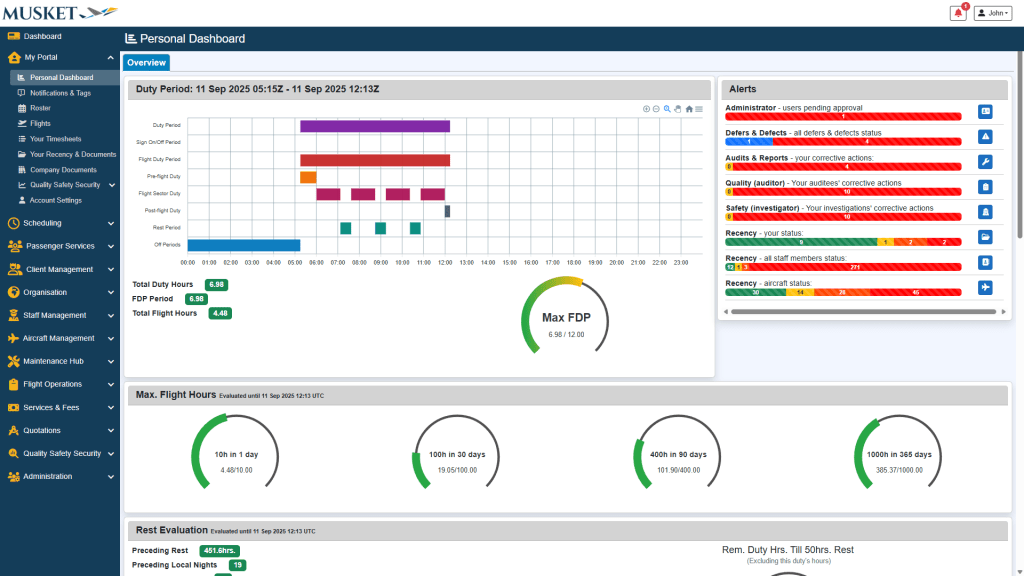
Personal Dashboard

Features:

  • Real-time FDP, Duty, and Rest compliance tracking
  • View Off Day evaluation
  • Track Operational Recency including general, IFR, and night recency

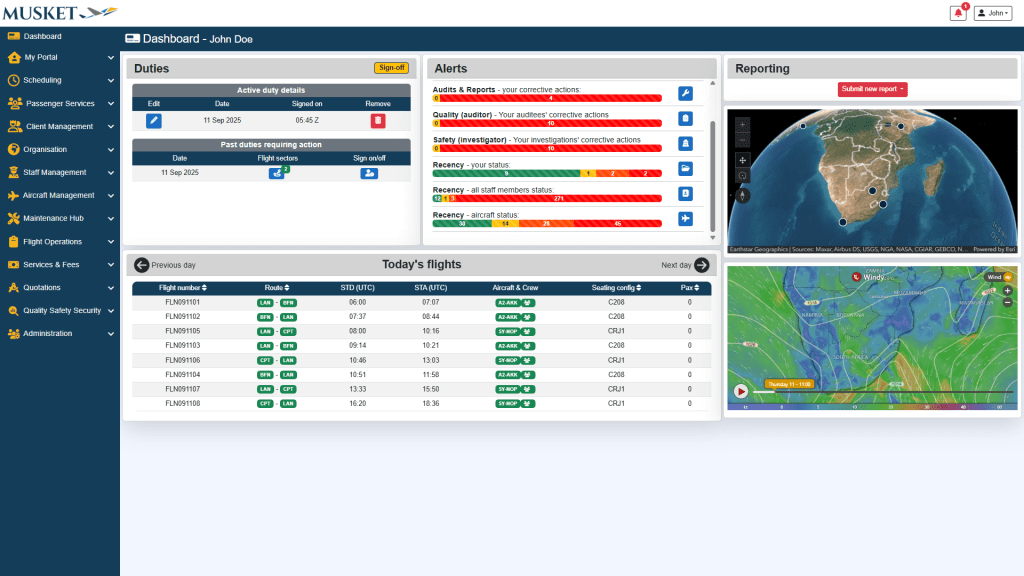
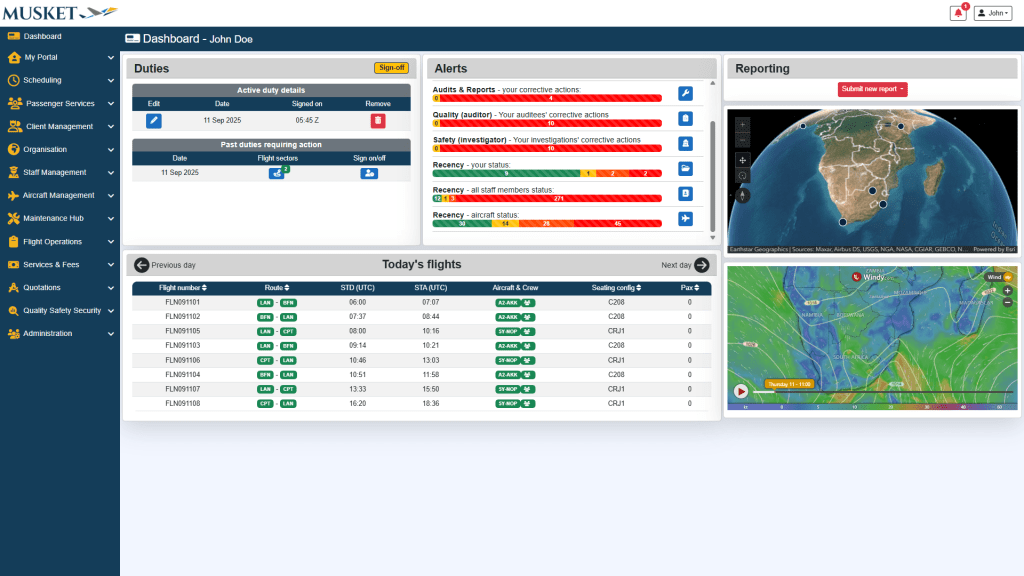
Main Dashboard

Features:

  • Sign on and off with the click of a button
  • View various alerts customized according to your role
  • Submit various types of reports
  • Quick overview of today’s flights

Book Your Demo

← Back

Thank you for your submission!

Your demo is officially on the radar. We’re excited to show you how effortless flight operations can be. One of our experts will be in touch shortly to confirm the details. ✈️ Until then, sit back, we’ll handle the heavy lifting
Required Features

Data Security You Can Trust

Features:

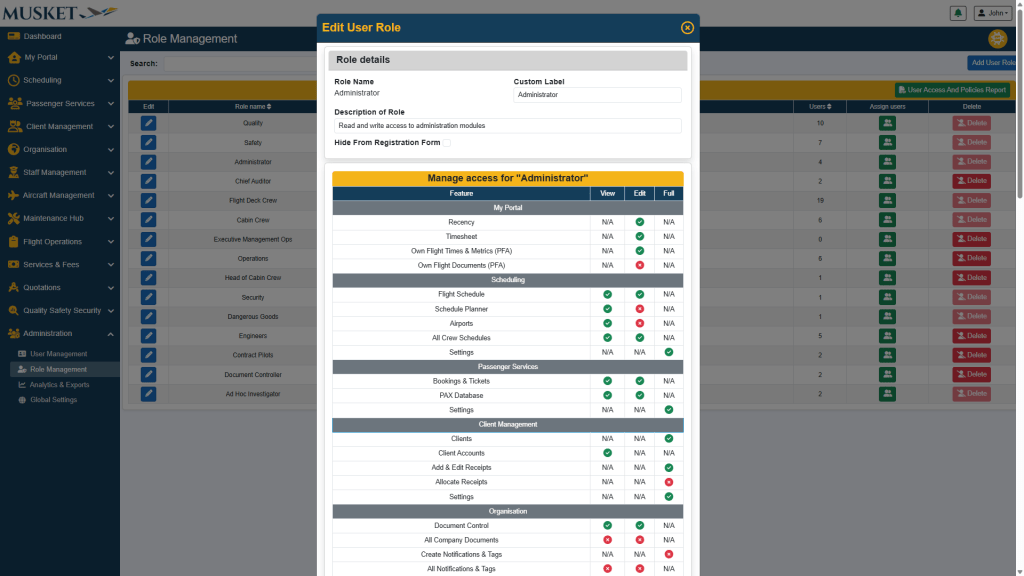
  • Control who can view accounts, add/edit receipts, and allocate receipts
  • Apply feature‑level rights (view/edit/full) by role
  • Keep financial actions limited to authorized personnel

Real-time ledger transparency

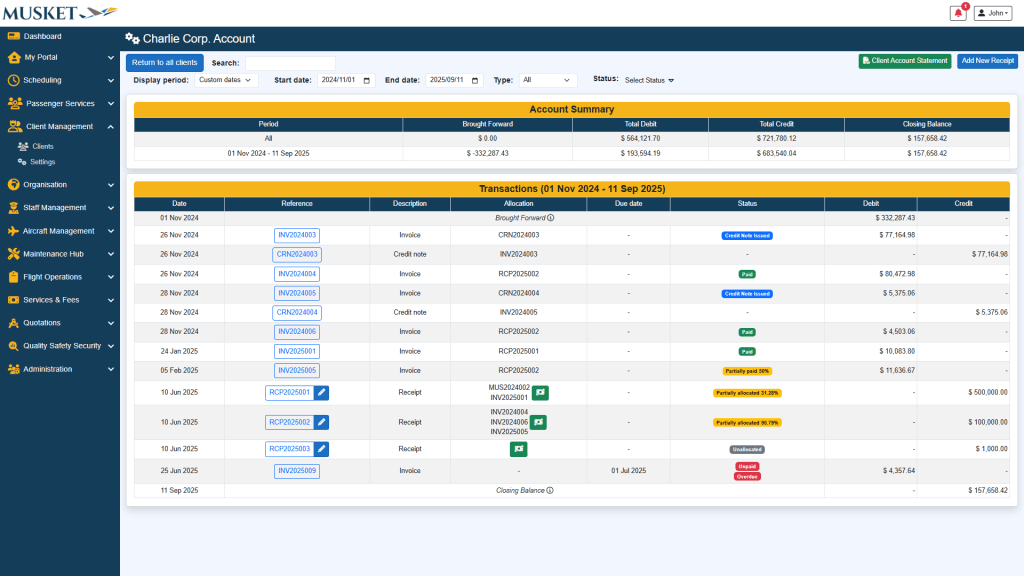
Features:

  • Account summary by period: debits, credits, closing balance
  • Detailed transaction list: invoices, credit notes, receipts, allocations, due dates
  • Status indicators (e.g., Paid, Allocated, Unallocated, Partially paid)
  • Open and export original documents (invoice/receipt/credit note) directly from the ledger

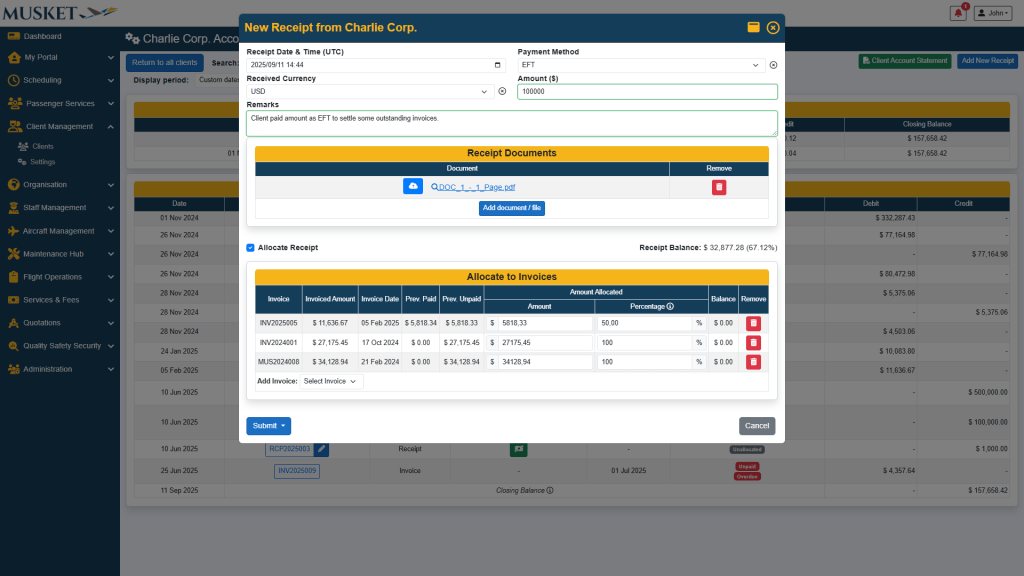
Smart Receipt Allocation

Features:

  • Record receipts in foreign or local currency with configurable exchange rates
  • Allocate a single receipt across single or multiple invoices
  • Generate professional receipt PDFs instantly
  • See running balances update in real time
  • Maintain a clear allocation history for auditability

Statements Made Simple

Features:

  • Generate Client Account Statements for any period
  • Statements include transaction dates, references, due dates, status, and more
  • Include account summary with brought forward, totals, and closing balance

Invoice in Seconds

Features:

  • Open a client’s Quotes & Invoices workspace directly from their profile
  • Create proforma/invoices, and link quotes to operational planning (as applicable)
  • Preview and download billing documents from within the client context

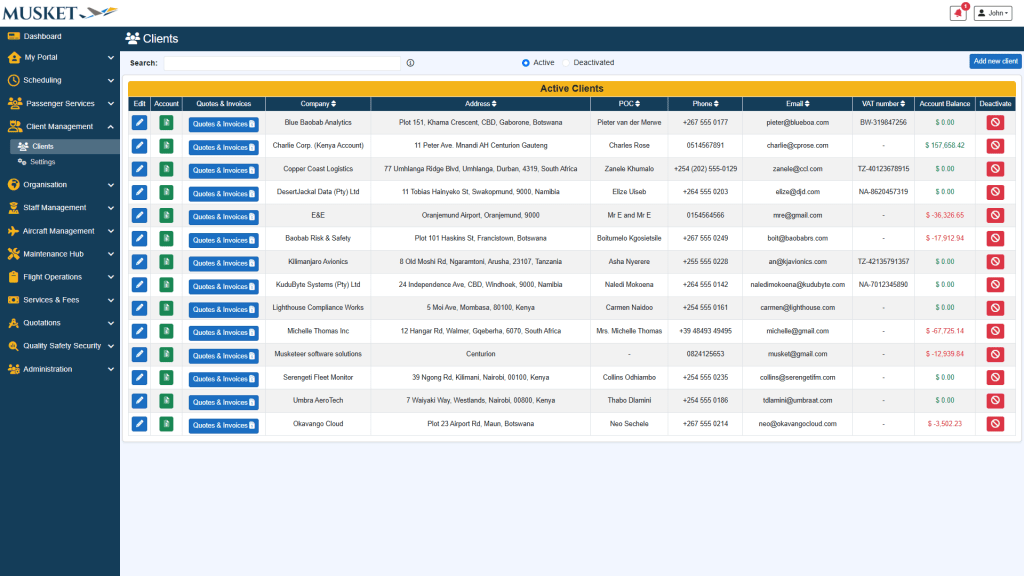
Know Your Clients

Features:

  • Create and edit client profiles (POC, contacts, address, VAT, etc)
  • Quick‑access to client accounts and their quotes & invoices
  • Set account currency per client
  • View live account balance

Loading Comments...